



Dealership Integrations
Keep useful customer context connected.
Your dealership may already rely on a CRM, inventory feed and finance tools. TECOBI supports connections that bring relevant information into the customer conversation and return supported activity to other systems. Each integration has a defined job, so your team can understand where information comes from and where the next action belongs.


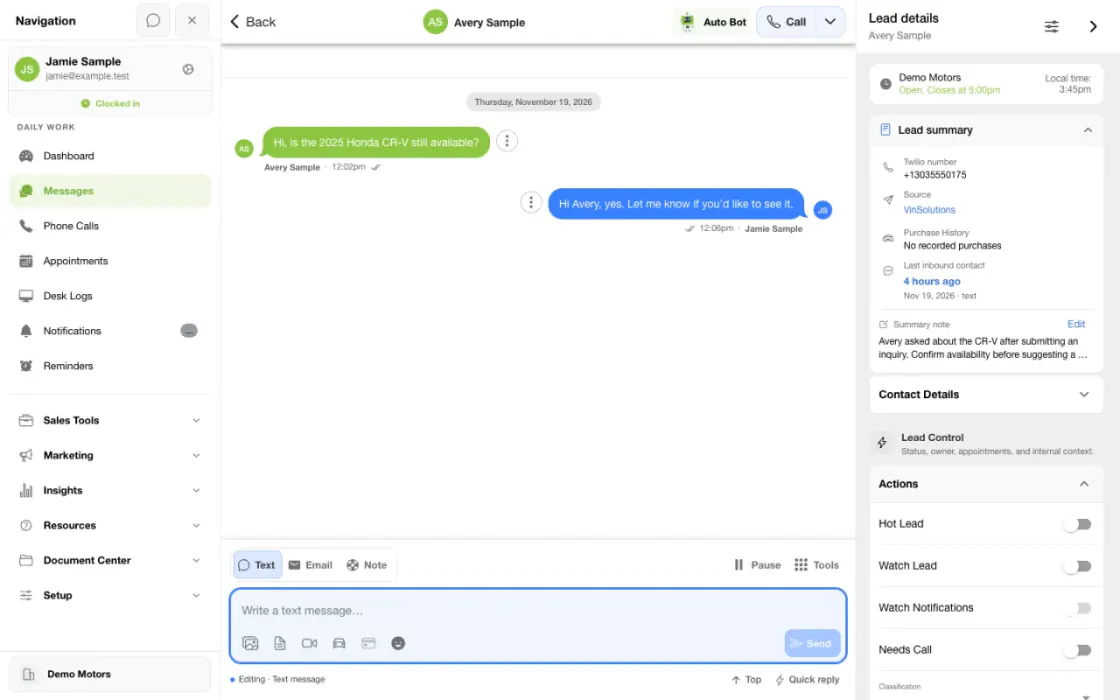
Check the handoff from the lead source to the salesperson
Start with one supported source, one dealership and a known test record. Follow it through the configured connection before expanding the workflow.
- Identify the directionDecide whether you need inbound lead delivery, supported activity writeback or a different connection.
- Review the linked recordCheck the expected source and customer context in TECOBI.
- Confirm the resultVerify the intended record or accepted activity in the destination system.
What it helps you do
Carry context across the handoff.
Supported integrations can connect lead information, communication activity, inventory or finance steps so the team has less information to re-enter.
Know which system does what.
Clarify which system creates the lead, which receives supported updates and where staff should complete each task.
Make the next question easier to answer.
Available inventory and customer context help staff continue the shopper’s conversation while connected finance tools support later buying steps.
Put your data to work beyond one screen.
Bring customer lists into TECOBI, export selected lead details and connect reporting tools through read-only API access. Match each workflow to the information your dealership needs.
Give each integration the access it needs.
An authorized account administrator can choose an API token’s data permissions, set expiration and IP restrictions, rotate or revoke it, and review its access history.
How it works
Identify the systems you use.
List the dealership’s CRM, inventory and finance tools along with the information you want to exchange.
Confirm the supported connection.
Review the specific provider’s supported records, direction of data flow, permissions and setup requirements with TECOBI.
Complete authorized setup.
Have the appropriate account administrator arrange the connection and credentials through the supported setup process.
Check the intended workflow.
Review an authorized lead or activity through the connected systems and confirm where staff should look for updates. Contact support when a particular step does not arrive as expected.
Setup and availability
Availability and data coverage vary by provider, dealership configuration and permissions.
A configured connection does not imply that every operation is enabled or that a particular update has arrived.
Provider access, subscriptions and any associated terms must be established for the intended dealership.
CSV imports and exports cover their supported fields and workflows; they do not recreate an entire previous CRM or every historical conversation.
API data access is read-only and scoped. Available fields, timestamp definitions, pagination and request limits apply.
Background processing, a saved configuration or an email notification does not by itself establish that an import, download or provider handoff completed successfully.
Questions dealers ask
Which CRM integrations does TECOBI document?
TECOBI’s public directory includes VinSolutions, Fortellis/eLead and ProMax. Their supported lead import, activity and writeback behavior differ, and an integration must be configured for the dealership. When the connection and lead-pull controls are enabled, eligible VinSolutions leads can be brought into TECOBI. Eligibility depends on lead status, lead type and configuration. TECOBI checks available phone and email information for an existing dealership lead. Confirm the setup and eligibility for your dealership.
Are integrations limited to CRM systems?
No. TECOBI also documents connections for inventory, credit and other dealership workflows. The appropriate connection depends on your provider and the particular information or action you need.
Will every field synchronize in both directions?
No. A supported integration is not a full mirror of both systems. Lead import, activity writeback, appointments and other data may have separate capabilities and controls. When writeback is enabled and a matching VinSolutions record exists, eligible staff-sent outbound messages, completed calls and appointment events can be sent back. The integration does not include every conversation or activity: incoming messages, automated outreach, broadcasts and internal messages are not included in the ordinary staff-message writeback. Confirm the supported workflow for your dealership.
Can automotive lead providers send ADF/XML leads?
TECOBI supports ADF/XML lead intake. The receiving address, acceptance settings and provider delivery must be configured for the correct dealership. A saved setting alone does not confirm that a lead arrived.
What should I include in an integration support request?
Identify the provider, the type of record or update that is missing, the intended direction and the approximate time. Share account-specific evidence through TECOBI support, not API keys or customer documents in this public chat.
Can our reporting tool read TECOBI data?
TECOBI’s client data API provides read-only access to supported records such as leads, messages, calls, appointments, inventory and recorded sales. An authorized account administrator chooses the token’s data permissions. The token is tied to one dealership, and the current API catalog defines the available fields. This access does not send messages or edit CRM records.
Is the API a complete real-time copy of everything in TECOBI?
No. It provides supported records and fields through paginated reads, with request limits. Date filtering follows each resource’s defined timestamp; a record’s creation date does not capture every later edit. The API does not provide a complete change feed or deleted-record notifications. Your reporting provider should plan how to reconcile updates and follow all returned pages.
Can we bring an existing customer list into TECOBI?
The supported Lead Imports workflow accepts a CSV with column headers and mapped fields. The upload form requires First Name, Last Name, and Cell Phone or Email Address, with optional details such as salesperson email, company, address and sales department. Import permission is required, and processing happens in the background. Sold-lead files need the separate TECOBI import process; do not include them in the standard upload.
Will every row in an import become a new customer?
No. The import checks for an existing record in the dealership using the phone number, or the email address when no phone is supplied. It reports new leads and existing matches separately. Unsupported or invalid contact details can prevent a row from being imported. A matched customer can receive a mapped salesperson assignment; a conflicting existing sales department is preserved. Review the import results instead of assuming the file row count equals new customers.
Can we export our lead information?
Users with lead export permission can choose supported CSV fields, including customer contact details, status, salesperson, source, vehicle of interest and appointment information, and filter by customer creation dates. Standard lead exports run in the background. A completed export can be downloaded from Export History by the requesting user with current account access and permission. These generated files expire seven days after completion; an export is not a backup of every conversation or document.
Does a credit application transfer mean a lender has approved the customer?
No. Transferring an application to a configured finance provider, submitting it to a bank and receiving a credit decision are separate steps. For example, a RouteOne application transfer is not confirmation of a bank submission. Confirm the next step with your dealership’s authorized team and the provider.
Will the DealerTrack application handoff transfer my entire pencil or deal structure?
The current application handoff should not be treated as a complete pencil transfer. Vehicle, trade and deal-structure details have separate coverage requirements. Confirm the exact information your dealership’s connection supports before planning on a build-once workflow.
ASK ME ABOUT IT
BETTER TOGETHER
Connect the next step.
Explore how these TECOBI solutions fit into your dealership’s workflow.