



Enterprise reporting
See the whole group. Know where to focus.
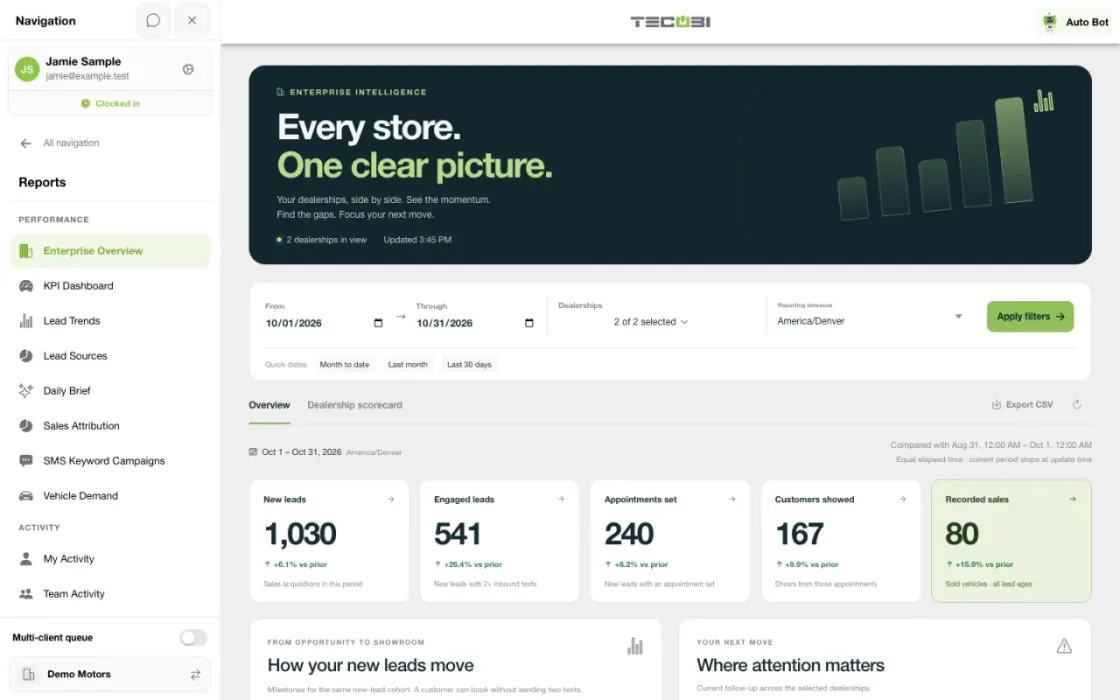
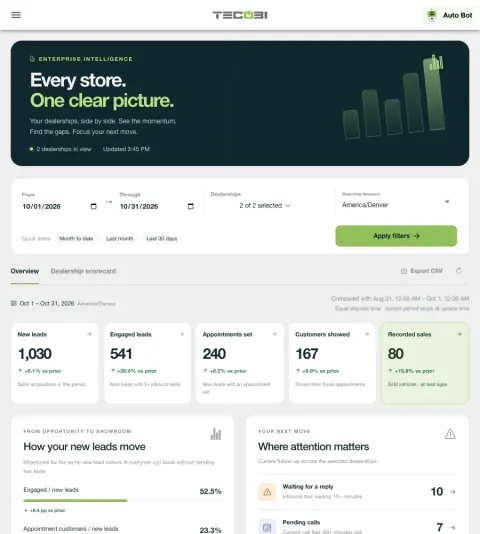
When you manage more than one dealership, a group total is only the start. TECOBI Enterprise Overview brings selected stores into one view so leaders can compare recorded activity, investigate differences and find the next conversation worth attention.
Read the stores side by side
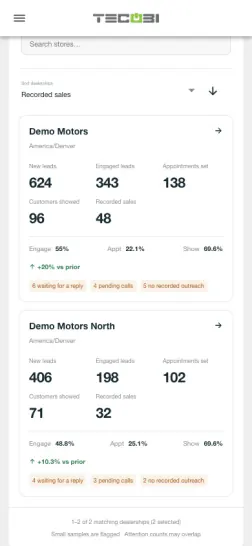
Apply the same period and timezone, then use the store scorecard to decide which store or queue needs a closer look.
| Group | Appointments set | Appointments showed |
|---|---|---|
| Store A | 82 | 47 |
| Store B | 65 | 44 |
| Store C | 41 | 24 |
Compare your stores in one place
Start with a consistent view of the dealerships you are authorized to manage.
- Enterprise Overview brings new leads, engagement, appointments, recorded sales and current follow-up gaps together across selected dealerships.
- Choose assigned stores, a reporting timezone and a date range of up to 366 days. The comparison uses the immediately preceding interval of equal elapsed length; an open period stops at update time.
- The dealership scorecard supports on-screen search and sorting. Export CSV includes all stores in the applied selection, not only the rows currently visible in the filtered scorecard.
Make the numbers useful
Understand how the report measures activity before comparing stores or periods.
- New leads, engaged leads, appointments, shows and recorded sales use distinct eligibility and date rules. Sales in the period can include customers acquired earlier.
- Group rates use combined counts rather than an average of store percentages. Rows with fewer than 20 new leads are flagged as small samples.
- A zero means no matching TECOBI records in the selected scope; it does not establish that every outside source is connected.
Find the next opportunity for your team
Move from a group view to the conversations that may need attention.
- For eligible multi-store reporting users, Enterprise Overview highlights waiting replies, pending calls and new leads with no recorded text or call outreach.
- Attention counts are a current snapshot using the report’s eligibility and elapsed-time rules. Categories can overlap, so adding them together does not produce a unique customer count.
- Open permitted customer detail and review the actual conversation before coaching or contacting the customer. Visibility of customer detail follows the user’s lead access.
Use the report with the right context
Treat reporting as a way to ask better questions and support a consistent process.
- Enterprise Overview requires report access and membership in more than one dealership; available stores and customer detail follow the user’s permissions.
- Recorded activity and outcomes do not guarantee a sale or prove that one message or campaign caused it.
Put the workflow into practice.
Open Reports → Enterprise Overview with an eligible multi-store reporting account.
Choose the dealerships, dates and reporting timezone, then apply the filters.
Review the group overview and dealership scorecard, including current attention counts and the underlying metric definitions.
Open available customer detail or export the selected-store scorecard, then use that context to coach the next step.
Connected TECOBI tools
Customer story · Hamilton Auto Group
How Hamilton Auto Group Unified Follow-Up Across Five Locations
Hamilton Auto Group uses TECOBI to create one consistent engagement motion across five rooftops without building a formal BDC. TECOBI gives each location immediate contact, sustained follow-up , and clearer management visibility while still letting local sales teams own the customer conversations that move deals forward.
Questions dealers ask
How does Enterprise Overview compare new leads, appointments and sales?
New leads are Sales acquisitions received in the period, excluding transfer arrivals and DMS offers. Engaged leads have at least two inbound texts in that period. Appointment counts cover those new leads with a non-cancelled appointment created in the period; shows are recorded shows from those appointments in the period. Recorded sales count distinct sold vehicles in the period, including older leads; a sold log without a recorded sold vehicle counts once. Engagement and appointment rates divide by new leads; show rate divides by appointment customers. Group rates use combined counts, not an average of store percentages. Sales are a separate period measure, not a new-lead conversion rate.
Which stores and periods can I compare in Enterprise Overview?
The report requires report access and membership in more than one dealership. Choose from your assigned stores and a date range of up to 366 days. The comparison uses the immediately preceding interval of equal elapsed length; an open period stops at update time. Rows with fewer than 20 new leads are flagged as small samples. A zero means no matching TECOBI records, not proof that every outside source is connected. Customer detail still follows your lead access, so its visible customer count can differ from a group total or vehicle sales count.
What do Waiting for a reply, Pending calls and No recorded outreach mean?
These Enterprise Overview counts are a current snapshot. Waiting for a reply identifies an eligible inbound text waiting at least 15 minutes that has not been dismissed. Pending calls requires a current Needs Call flag with a known timestamp at least 60 minutes old. No recorded outreach covers new leads from the selected period, at least 15 minutes old, with no qualifying recorded outbound text or call attempt since arrival. Thresholds use elapsed time, including closed hours; the separate Needs Call Wait report uses business hours. Attention excludes paused, archived, opted-out and sold leads, and inactive or suspended stores. Categories can overlap, so do not add them as unique customers.
Do these attention counts mean AI has evaluated or contacted each customer?
No. Enterprise attention uses recorded activity and status rules to identify work worth reviewing. It does not establish conversation quality, send a follow-up or complete a task. Notification Activity is another view of team inbox state; a notification marked read is not proof that a salesperson contacted the customer.
Setup and availability
Sales & AI Reporting: setup and availability
Available report views and drill-down access depend on account permissions and configuration.
Reports describe recorded data and defined attribution rules; they do not guarantee results or establish causation.
Example screenshot values illustrate the interface and are not promised dealership performance.
Submission and assignment history depend on when tracking began. A period can have partial or unavailable coverage.
Vehicle Demand uses recorded interest and current in-stock inventory. It does not measure every shopper, predict future sales or automatically purchase inventory.
Salesperson Performance & Coaching: setup and availability
Call insights depend on available recordings and processing; a transcript or summary may be delayed, partial or unavailable.
AI summaries, sentiment labels and scores can be mistaken. Managers should review the underlying conversation before using them to make judgments.
Conversation and reporting access follows the user’s permissions. Available metrics depend on the selected report, date range and recorded activity.
The screenshots use demonstration identities and figures. They do not establish a performance benchmark, a sales result or a live customer outcome.
Call-needed wait and assignment measures depend on recorded event history and tracking coverage. Missing tracking is not zero activity.
Activity and scoring labels are signals to review. They do not prove a successful conversation, an appointment or the cause of a sale.
Automotive CRM & Lead Management: setup and availability
Available tools depend on dealership configuration and user permissions.
Integration coverage varies by provider; TECOBI does not automatically synchronize every field with every CRM or DMS.
Pipeline and activity screens describe recorded work; they do not guarantee a sale or prove why it happened.
Survey access depends on dealership membership and user role or assignment. Automatic post-sale survey requests require enabled configuration and an active sending workflow; no universal schedule, delivery or response is promised.
Text Ninjas is an optional service. Confirm the service scope, coverage hours, handoffs and current pricing with TECOBI. No particular staffing ratio, response-time guarantee or managed phone service is promised here.
ASK ME ABOUT IT