



Vehicle Acquisition Follow-Up
Keep the conversation moving when a customer wants to sell.
A customer asking to sell or trade a vehicle may be starting a different conversation from a shopper asking about inventory. TECOBI gives your team a configured way to follow up on eligible vehicle acquisition inquiries and keep the conversation connected to the customer record.
Follow an inquiry from someone selling a vehicle
A seller asks about their car. Keep the vehicle and their request in view before moving them into follow-up.
- Confirm this is a seller inquiryCheck the source, vehicle and any offer details available.
- Review the acquisition ruleChoose the timing and message that fit the seller’s situation.
- Escalate a ready sellerUse the appropriate staff follow-up option when the customer needs a person.
Start with a vehicle acquisition inquiry
Give someone interested in selling or trading a relevant next step.
- Eligible ADF/XML inquiries recognized as KBB ICO, CarGurus Sell My Car or CARFAX trade-in sources can enter Vehicle Acquisition-Fresh. Recognition depends on the source details and ingestion path.
- The vehicle and customer details available from the inquiry stay connected to the lead workflow, so the team can review what is known before continuing the conversation.
- Confirm the source and dealership setup with TECOBI; this does not mean every trade or appraisal inquiry enters the same automation.
Set up follow-up around your process
Choose a message and timing that fit a customer who may want to sell.
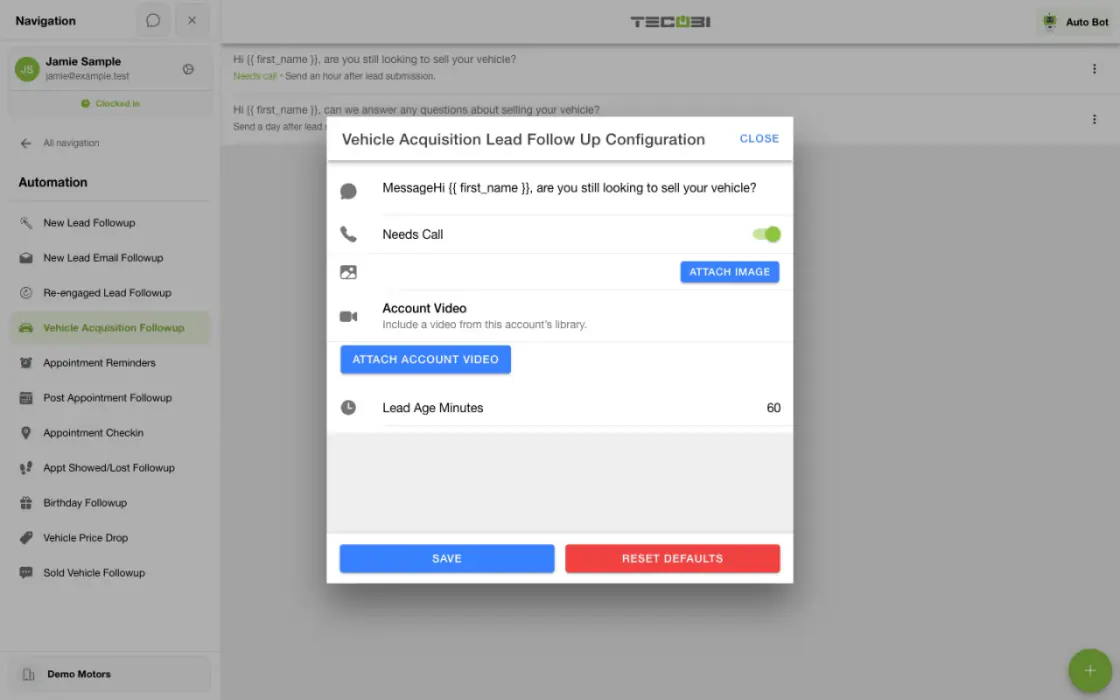
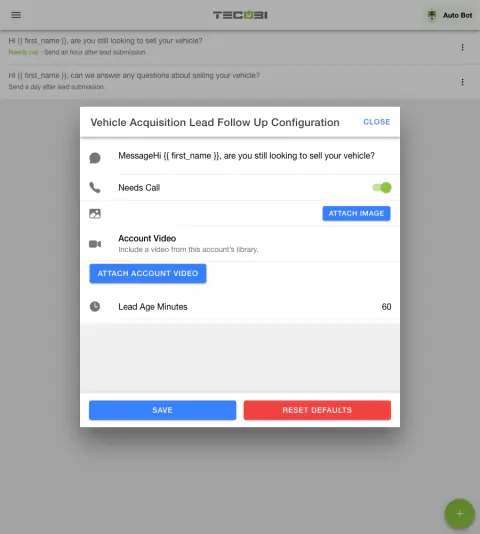
- An authorized administrator can manage the separate Vehicle Acquisition Followup message steps under Automation. Each step has a message and a Lead Age Minutes setting.
- Available configuration can include a Needs Call flag and supported image, GIF or account-video attachment. The flag requests staff attention; it is not a completed call.
- This is a configured template sequence for acquisition inquiries. Auto Bots are a separate AI-assisted follow-up workflow.
Continue only when the customer and record are eligible
A saved template is not a promise that every inquiry will receive every step.
- The workflow checks the acquisition status and submission timing, recent message activity and whether earlier configured steps have been recorded.
- Paused or archived conversations, customer contact restrictions, certain customer replies, appointments and staff activity can affect eligibility. Dealership settings also affect how outbound calls interact with follow-up.
- Your team can review the customer’s conversation and decide when a person should step in. An inquiry, queued step or saved message alone does not establish delivery.
Turn interest into a useful next action
Use the conversation to learn what the customer wants and keep the process clear.
- Review the vehicle information and customer context available on the record, then help with an appraisal or other appropriate dealership next step.
- When a person needs to call, the team can work the available Needs Call queue and record the outcome in TECOBI.
- Availability, permissions, supported providers and actual delivery depend on the dealership’s setup and the customer’s record.
Put the workflow into practice.
Connect supported acquisition inquiries to the dealership’s customer workflow.
An authorized user reviews the configured vehicle acquisition follow-up messages and timing.
Eligible leads can receive the configured steps as the workflow processes them.
Your team reviews the customer conversation, answers questions and handles the next dealership decision.
Connected TECOBI tools
Questions dealers ask
How is this different from a CRM reminder?
A reminder asks a person to remember and complete the next touch. Auto Bots® can carry out configured proactive follow-up, while your team stays responsible for the relationship and decisions.
What happens when the customer replies?
The reply returns to the shared conversation. Response Bot can handle eligible routine inbound questions or route the thread to a person when human attention is needed.
How is a work queue different from a lead list?
A lead list helps find and filter records. A work queue focuses on a defined condition, such as a waiting inbound text or a needs-call flag, within the user’s access and the account’s workflow rules.
Setup and availability
Automotive CRM & Lead Management: setup and availability
Available tools depend on dealership configuration and user permissions.
Integration coverage varies by provider; TECOBI does not automatically synchronize every field with every CRM or DMS.
Pipeline and activity screens describe recorded work; they do not guarantee a sale or prove why it happened.
Survey access depends on dealership membership and user role or assignment. Automatic post-sale survey requests require enabled configuration and an active sending workflow; no universal schedule, delivery or response is promised.
Text Ninjas is an optional service. Confirm the service scope, coverage hours, handoffs and current pricing with TECOBI. No particular staffing ratio, response-time guarantee or managed phone service is promised here.
Auto Bots® Follow-Up: setup and availability
Auto Bots® handle proactive text follow-up. Inbound Response Bot replies, staff phone calls and this website’s Talk guide are separate workflows.
Your dealership’s audience, timing, hours and sending controls determine which conversations are eligible. Recent activity, customer restrictions and human handoffs can pause or change the next touch.
Authorized users can review and adjust the configuration. Follow-up and reporting help your team work opportunities; they do not guarantee a response or sale.
Event-triggered template automations are separate from AI Auto Bots. Each workflow has its own configuration, timing and eligibility checks; no universal cadence or identical inactivity rule applies to all of them.
Business Texting for Dealership Teams: setup and availability
Texting requires an eligible contact and correctly configured sending number; carrier delivery is not guaranteed.
Opt-out and account controls may restrict sending. Staff should respect customer contact preferences.
Available media types and delivery behavior differ between SMS, MMS, links and email.
Sales Work Queues & Reminders: setup and availability
Queue visibility and claim behavior vary with account access, lead assignments and configuration.
TECOBI-managed staffing services are separate from access to dealership queue screens.
Queue counts can require a refresh; a flag records work to consider rather than proving a completed customer interaction.
Personal reminders belong to the signed-in user and require continued dealership access. They do not assign tasks to other staff, send customer messages or record task completion.
Personal reminders are one-time. Notification timing can vary; Sent does not mean the task is complete.
AI Texting & Response Bot: setup and availability
Reply modes, delays, permissions and customer context determine when Response Bot runs. Connected inventory and appointment workflows depend on the dealership’s configuration.
Negotiation, finance decisions and questions requiring dealership judgment need a person. An AI answer is not a binding out-the-door quote or finance approval.
Dealership AI calling is not available yet. The website’s Talk guide explains TECOBI; it does not access private accounts or perform customer actions.
The example shows the shared conversation workspace with demonstration identities. It does not identify a particular message as AI-written.
ASK ME ABOUT IT