



SMS Usage Reporting
See your dealership’s messaging volume in context.
Text conversations help shoppers move forward on their own time. TECOBI’s SMS Usage report gives authorized dealership administrators a view of recorded messaging volume for a selected period, alongside available package information.
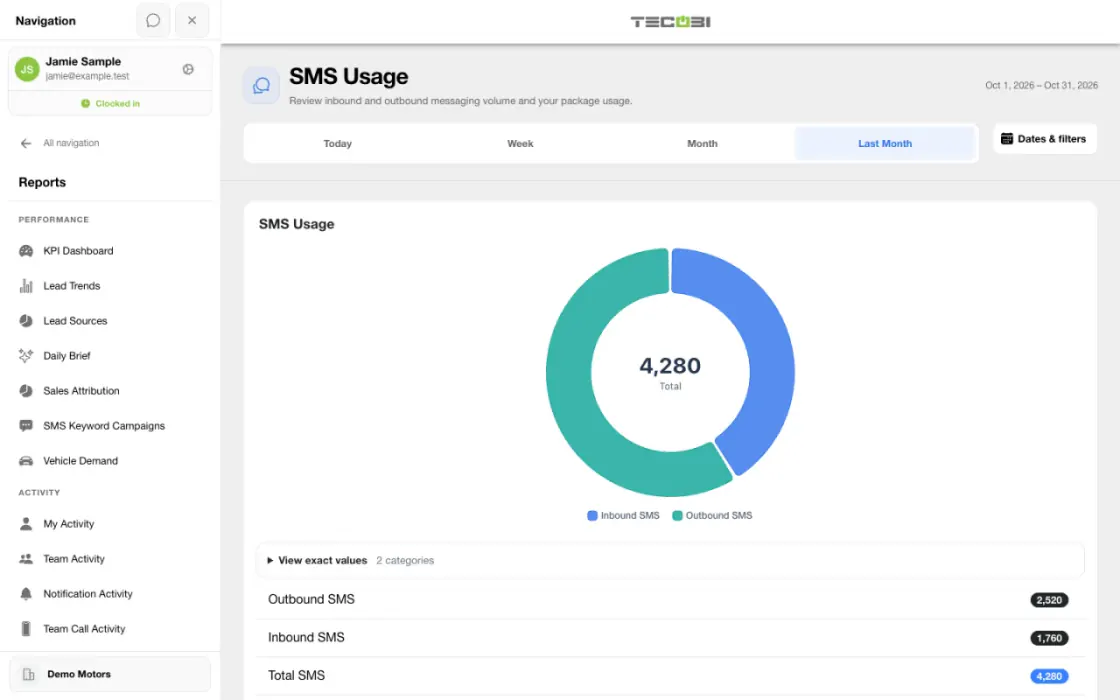
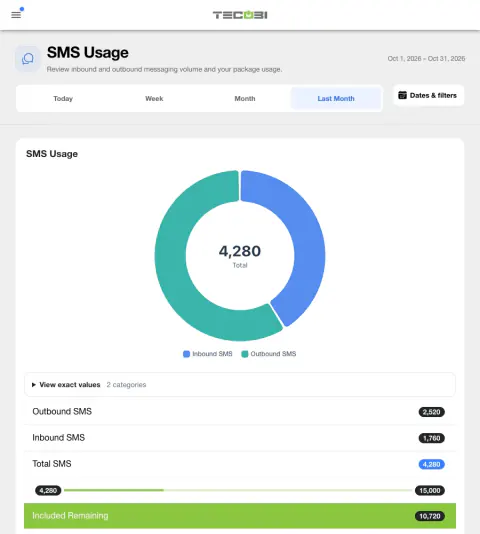
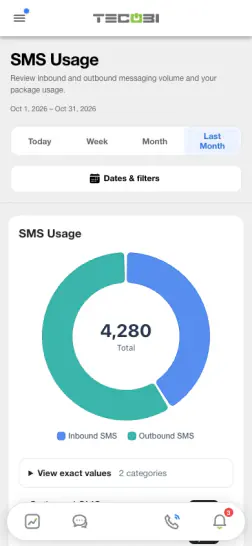
Break total usage into the two directions
Check what customers sent and what the dealership sent before comparing usage with the package information shown for that account.
Understand messaging activity at a glance
Start with the volume of recorded customer communication for the period you selected.
- The report offers Today, Week, Month and Last Month views for the selected dealership.
- A chart and summary display inbound, outbound and total SMS counts for the selected dates. Outbound is calculated from the total count less the inbound count.
- The report counts eligible message records with a non-null provider message ID field, excludes records linked to calls and excludes Text Ninja messages. A non-null field can still be empty.
- Counts depend on the selected period, filters and recorded data. A message count is not a count of unique customers or proof that every message was delivered.
Compare usage with available package information
Use the visible allowance as a prompt to discuss your dealership’s messaging plan.
- When the returned package includes the applicable allowance and overage settings, the report can display included remaining or overage and a calculated overage amount.
- The displayed calculation uses the count in the selected report period and the returned current package values. The report does not by itself establish the final invoice or contractual billing period.
- Package terms, limits, charges and availability depend on the dealership’s agreement. Contact TECOBI for account-specific billing questions rather than entering private account details in the public guide.
Use the right report for the next question
Usage volume and delivery outcomes answer different questions.
- The usage request does not filter by a delivery status. Open the appropriate messaging or delivery view to investigate a specific message’s available status.
- The usage report is available through the app navigation to authorized administrators and client administrators; access and dealership membership affect what a user can see.
- Figures may be cached for up to ten minutes, so a recent change may not appear immediately.
Turn a number into a useful next step
Discuss patterns with your team in the context of the customer conversation.
- For example, an administrator can compare recorded inbound and outbound volume across selected periods, then review the workflow behind a change. This is an illustrative example, not a promised outcome.
- A rise in message volume does not by itself establish more customer engagement, appointments or sales. Review the relevant reports and customer context separately.
Put the workflow into practice.
Open SMS Usage for the selected dealership and choose a report period.
Compare inbound, outbound and total recorded message counts.
Review the displayed package allowance and overage information when available.
Use message delivery and customer conversation views when your question requires more detail.
Connected TECOBI tools
Questions dealers ask
Why might two reports show different totals?
Reports may use different date fields, eligibility rules, scopes or outcome definitions. For example, an appointment created in a period is different from one scheduled to occur in it. Read the report’s definitions and filters before comparing totals.
Does a sent text mean the customer read it?
No. A send or delivery status is not proof that a person read the message or is ready to buy. Use the customer’s reply and the conversation context to decide what to do next.
Why might a text fail or be blocked?
Reasons can include an invalid or unsupported destination, an opt-out, the sending number’s configuration, registration or provider restrictions. Review the status or error and involve your administrator or TECOBI support. Do not repeatedly resend or override a customer’s contact preference.
Setup and availability
Sales & AI Reporting: setup and availability
Available report views and drill-down access depend on account permissions and configuration.
Reports describe recorded data and defined attribution rules; they do not guarantee results or establish causation.
Example screenshot values illustrate the interface and are not promised dealership performance.
Submission and assignment history depend on when tracking began. A period can have partial or unavailable coverage.
Vehicle Demand uses recorded interest and current in-stock inventory. It does not measure every shopper, predict future sales or automatically purchase inventory.
Business Texting for Dealership Teams: setup and availability
Texting requires an eligible contact and correctly configured sending number; carrier delivery is not guaranteed.
Opt-out and account controls may restrict sending. Staff should respect customer contact preferences.
Available media types and delivery behavior differ between SMS, MMS, links and email.
Automotive CRM & Lead Management: setup and availability
Available tools depend on dealership configuration and user permissions.
Integration coverage varies by provider; TECOBI does not automatically synchronize every field with every CRM or DMS.
Pipeline and activity screens describe recorded work; they do not guarantee a sale or prove why it happened.
Survey access depends on dealership membership and user role or assignment. Automatic post-sale survey requests require enabled configuration and an active sending workflow; no universal schedule, delivery or response is promised.
Text Ninjas is an optional service. Confirm the service scope, coverage hours, handoffs and current pricing with TECOBI. No particular staffing ratio, response-time guarantee or managed phone service is promised here.
AI Texting & Response Bot: setup and availability
Reply modes, delays, permissions and customer context determine when Response Bot runs. Connected inventory and appointment workflows depend on the dealership’s configuration.
Negotiation, finance decisions and questions requiring dealership judgment need a person. An AI answer is not a binding out-the-door quote or finance approval.
Dealership AI calling is not available yet. The website’s Talk guide explains TECOBI; it does not access private accounts or perform customer actions.
The example shows the shared conversation workspace with demonstration identities. It does not identify a particular message as AI-written.
ASK ME ABOUT IT