



SMS keyword campaigns
Turn a text-in response into a real conversation.
Give shoppers a simple way to respond to a dealership promotion by text. A configured keyword on an existing TECOBI number can connect an incoming message to the right campaign, an automatic reply and your dealership’s customer workflow.
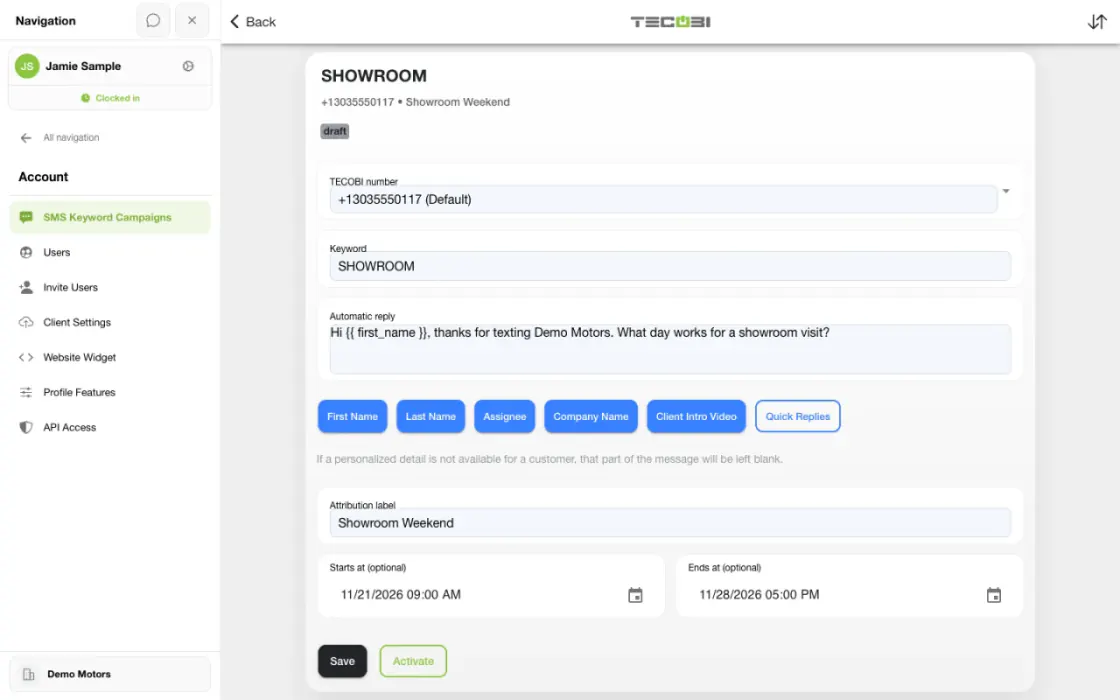
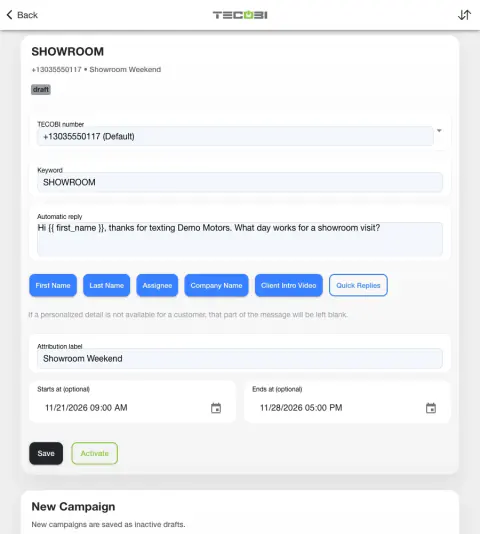
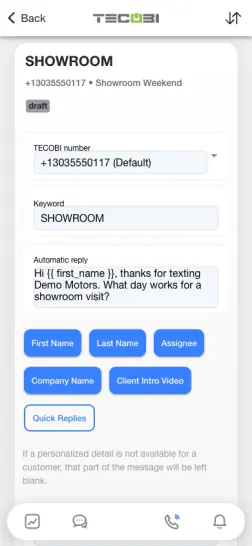
Give a printed campaign a clear text response
A showroom sign offers a keyword for a specific question. Set a reply that quickly tells the shopper what happens next.
- Choose an easy keywordPick a short word that matches the intended offer.
- Prepare the replyUse the supported campaign settings to explain the action or next step.
- Confirm the resulting conversationReview the expected handling before distributing the keyword.
Give an advertisement a text-first next step
Let a shopper start a conversation when the message is relevant to them.
- A keyword campaign responds to an incoming shopper text. A text blast starts with your dealership sending a message to a selected audience; the two workflows have different triggers.
- An authorized user chooses an existing TECOBI number, a keyword or phrase, an automatic reply and an attribution label. Optional start and end dates define when the enabled campaign is eligible.
- The matching logic ignores capitalization and recognizes the configured whole word or phrase within a longer incoming message. A word that merely contains the keyword is not treated as a match.
- Save the configuration as a draft and review it before activation. Availability and permissions depend on your dealership setup; confirm the current workflow with TECOBI.
Connect the reply to the customer relationship
Keep the information your team needs together after a shopper responds.
- For an eligible message that matches one active campaign, TECOBI can prepare the configured campaign reply and record the associated campaign touch.
- A new lead can receive the campaign source label and follow the dealership’s normal lead assignment. An existing lead keeps its original acquisition source; a stale lead can be reactivated with a campaign note.
- If an incoming message matches multiple active campaigns, TECOBI can record the ambiguity rather than choosing a campaign reply. An opt-out request takes priority over a campaign reply.
- The recorded campaign reply and an actual delivered message are separate events. Sending and follow-up depend on processing, customer messaging restrictions and dealership configuration.
- The configured initial campaign reply is separate from Response Bot. Later customer replies can enter normal Response Bot handling when dealership settings and message eligibility allow.
See what happened after the text
Use the report to understand recorded campaign activity and the next step.
- The date-filtered SMS Keyword Campaigns report can show qualifying incoming texts, new leads, reactivations, appointments, shows and sold leads by campaign.
- For reported outcomes, the latest qualifying campaign touch at or before the milestone is considered within a 30-day window; a lead is counted once per outcome metric.
- Attribution is a reporting rule, not proof that the campaign caused the appointment or sale. Review the date range and customer context before interpreting results.
- Campaign setup and texting responsibilities remain with the dealership. Follow your applicable consent practices and messaging requirements; a keyword alone is not a guarantee of permission for future marketing.
Put the workflow into practice.
Choose an available dealership number and configure the campaign keyword, automatic reply and attribution label.
Review the configured dates and message, then activate the campaign when your team is ready.
Invite shoppers to text the keyword to that number through the advertising your dealership chooses.
Review qualifying responses in the customer workflow and use the available campaign report to examine recorded results.
Connected TECOBI tools
Questions dealers ask
What does TECOBI’s automotive CRM connect?
The lead workspace connects customer information, staff assignments, communication history and supported shopping steps. Auto Bots® provide proactive follow-up, Response Bot supports inbound text replies, and staff handle conversations that need a person.
How does TECOBI handle an opt-out text?
Recognized hard opt-out words can place the customer in a restricted state. Outbound sending checks restrictions and may block the message. Soft opt-out detection also supports non-standard requests that need attention.
Does an incoming reply or a call request remove an opt-out?
No. A new message or needs-call flag alone does not establish that a texting restriction has been removed. Review the current record and follow the supported consent workflow.
Will AI answer every text?
No. Eligibility, conversation ownership and routing rules determine when AI should act. Some conversations belong with a salesperson, manager or another human workflow.
Setup and availability
Automotive CRM & Lead Management: setup and availability
Available tools depend on dealership configuration and user permissions.
Integration coverage varies by provider; TECOBI does not automatically synchronize every field with every CRM or DMS.
Pipeline and activity screens describe recorded work; they do not guarantee a sale or prove why it happened.
Survey access depends on dealership membership and user role or assignment. Automatic post-sale survey requests require enabled configuration and an active sending workflow; no universal schedule, delivery or response is promised.
Text Ninjas is an optional service. Confirm the service scope, coverage hours, handoffs and current pricing with TECOBI. No particular staffing ratio, response-time guarantee or managed phone service is promised here.
Business Texting for Dealership Teams: setup and availability
Texting requires an eligible contact and correctly configured sending number; carrier delivery is not guaranteed.
Opt-out and account controls may restrict sending. Staff should respect customer contact preferences.
Available media types and delivery behavior differ between SMS, MMS, links and email.
Targeted Text Broadcasting: setup and availability
Campaigns follow account permissions, messaging eligibility, configured volume limits and available customer data.
Scheduling and pacing do not guarantee carrier delivery or customer response.
AI messages and reply automation depend on the selected workflow and settings.
Messaging Consent & TECOBI Shield: setup and availability
Available controls depend on account configuration, the restriction type and user permissions.
Automated interpretation may need human review, and no feature guarantees legal compliance.
Contact restrictions must not be bypassed by duplicating a record or changing the communication workflow.
AI Texting & Response Bot: setup and availability
Reply modes, delays, permissions and customer context determine when Response Bot runs. Connected inventory and appointment workflows depend on the dealership’s configuration.
Negotiation, finance decisions and questions requiring dealership judgment need a person. An AI answer is not a binding out-the-door quote or finance approval.
Dealership AI calling is not available yet. The website’s Talk guide explains TECOBI; it does not access private accounts or perform customer actions.
The example shows the shared conversation workspace with demonstration identities. It does not identify a particular message as AI-written.
ASK ME ABOUT IT