



Hard Opt-outs Report
Understand when customers opt out of texts.
A customer opting out is a signal worth understanding. TECOBI’s Hard Opt-outs report helps authorized dealership teams review recorded opt-outs alongside lead age and recent text activity, so they can investigate patterns and make informed follow-up decisions.
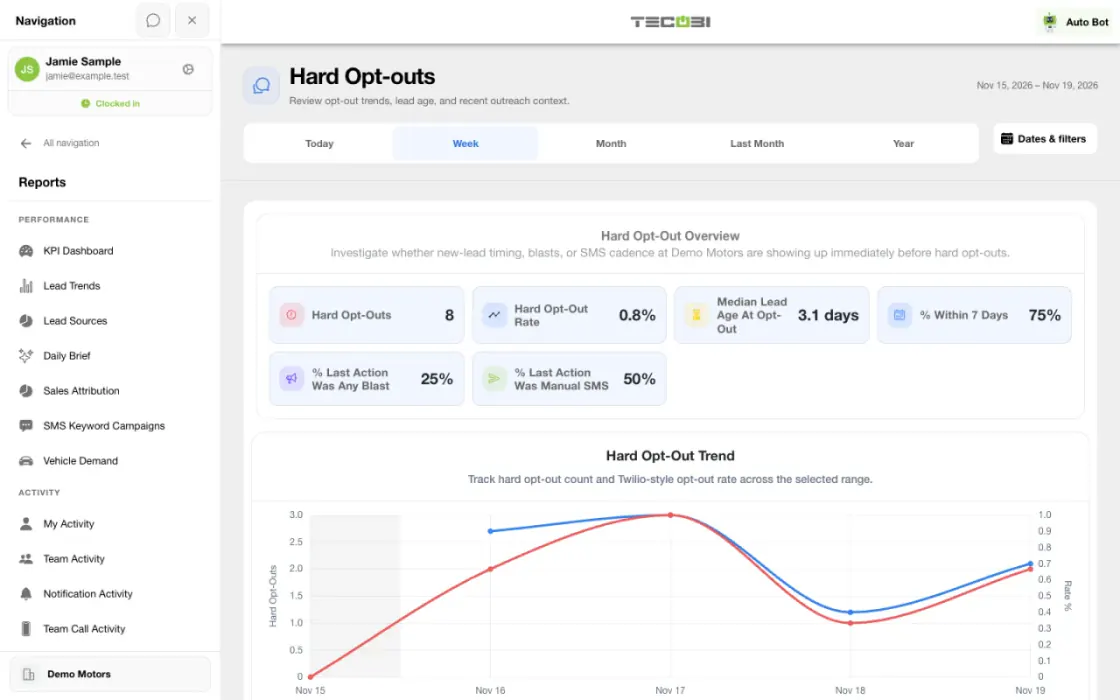
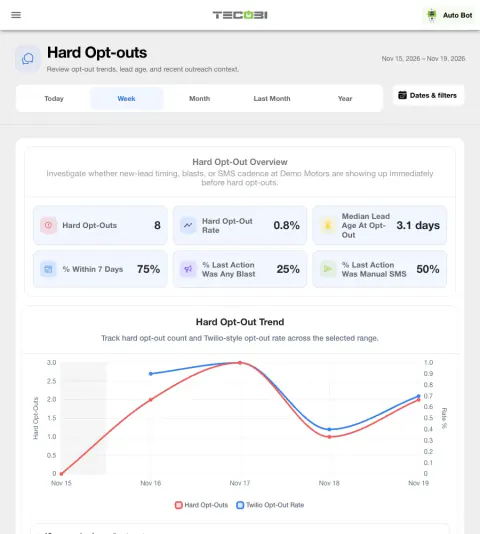
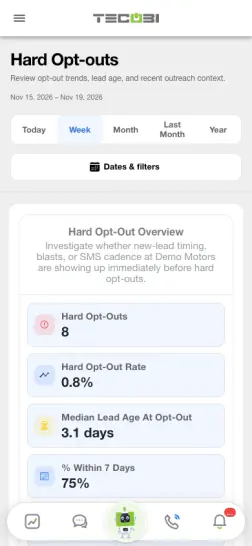
Trace an opt-out to its context
Use the report to decide which conversations need a closer look. Reviewing the message history helps you see whether an outreach pattern warrants a change.
- Find the patternFilter the recorded opt-outs by the lead source or classification you want to review.
- Check what preceded itLook for the last eligible text action and how long the lead was active.
- Read the conversationUse the underlying context to decide whether to adjust audience, timing or copy.
See when opt-outs happen
Understand the timing around a customer’s decision.
- For the selected dealership and period, the report counts the first recorded hard opt-out for each eligible lead in that period.
- Lead age is measured from the lead’s creation time to the recorded opt-out; it is not the time since the customer’s last inquiry.
- The trend groups results by day for ranges shorter than 91 days and by week for longer ranges. Daily closed-day shading uses the dealership’s configured hours and closures.
- The report can filter by available lead classification, lead source and inventory type. Data and access depend on dealership setup and user permissions.
Put the numbers in context
The rate and the activity breakdowns answer different questions.
- The summary rate divides recorded hard opt-outs by eligible outbound SMS records in the selected range whose provider message ID field is not null and whose status is sent, delivered or delivery-unknown. An empty ID value can still be included.
- The trend hides a period’s rate when fewer than 25 eligible outbound messages meet those status requirements. Counts and rates are not the percentage of unique customers contacted.
- The report groups the last eligible text action before the opt-out, including lead blasts, customer blasts, manual outbound SMS, automated system SMS or no prior eligible outbound text.
- Recent activity counts describe eligible outbound text records in the previous 24 hours and seven days. Last-action and cadence counts have different inclusion rules from the status-filtered rate denominator.
Move from a pattern to a conversation
Use the report as a starting point for a practical review.
- Review the lead-age, last-action and recent-activity breakdowns, then open an available customer conversation for the full context.
- For example, a manager can compare reported opt-outs following different types of outreach and review the surrounding conversations. This is an illustrative workflow, not proof that any message caused an opt-out.
- The report uses recorded data and may cache its summary for up to five minutes. A zero or missing result does not prove that no opt-out happened.
- A hard opt-out restricts messaging under the applicable workflow. This report does not itself establish consent or guarantee legal compliance.
Put the workflow into practice.
Open Reports → Hard Opt-outs with access to the dealership and select the report period.
Narrow the view by available classification, lead source or inventory type when useful.
Review the trend, lead age, last eligible text action and recent activity breakdowns.
Open an available customer conversation to understand the context before changing your messaging approach.
Connected TECOBI tools
Questions dealers ask
How does TECOBI handle an opt-out text?
Recognized hard opt-out words can place the customer in a restricted state. Outbound sending checks restrictions and may block the message. Soft opt-out detection also supports non-standard requests that need attention.
Does an incoming reply or a call request remove an opt-out?
No. A new message or needs-call flag alone does not establish that a texting restriction has been removed. Review the current record and follow the supported consent workflow.
Does TECOBI guarantee that every campaign is legally compliant?
No. These are operational controls that help teams manage communication preferences and restrictions. The dealership remains responsible for its consent practices, message purpose and applicable legal obligations.
Why might two reports show different totals?
Reports may use different date fields, eligibility rules, scopes or outcome definitions. For example, an appointment created in a period is different from one scheduled to occur in it. Read the report’s definitions and filters before comparing totals.
Setup and availability
Sales & AI Reporting: setup and availability
Available report views and drill-down access depend on account permissions and configuration.
Reports describe recorded data and defined attribution rules; they do not guarantee results or establish causation.
Example screenshot values illustrate the interface and are not promised dealership performance.
Submission and assignment history depend on when tracking began. A period can have partial or unavailable coverage.
Vehicle Demand uses recorded interest and current in-stock inventory. It does not measure every shopper, predict future sales or automatically purchase inventory.
Messaging Consent & TECOBI Shield: setup and availability
Available controls depend on account configuration, the restriction type and user permissions.
Automated interpretation may need human review, and no feature guarantees legal compliance.
Contact restrictions must not be bypassed by duplicating a record or changing the communication workflow.
Business Texting for Dealership Teams: setup and availability
Texting requires an eligible contact and correctly configured sending number; carrier delivery is not guaranteed.
Opt-out and account controls may restrict sending. Staff should respect customer contact preferences.
Available media types and delivery behavior differ between SMS, MMS, links and email.
Targeted Text Broadcasting: setup and availability
Campaigns follow account permissions, messaging eligibility, configured volume limits and available customer data.
Scheduling and pacing do not guarantee carrier delivery or customer response.
AI messages and reply automation depend on the selected workflow and settings.
AI Texting & Response Bot: setup and availability
Reply modes, delays, permissions and customer context determine when Response Bot runs. Connected inventory and appointment workflows depend on the dealership’s configuration.
Negotiation, finance decisions and questions requiring dealership judgment need a person. An AI answer is not a binding out-the-door quote or finance approval.
Dealership AI calling is not available yet. The website’s Talk guide explains TECOBI; it does not access private accounts or perform customer actions.
The example shows the shared conversation workspace with demonstration identities. It does not identify a particular message as AI-written.
ASK ME ABOUT IT