



Automation Response Rates
See how customers respond to automated follow-up.
Your team puts thought into every automated customer message. The Automation Response Rates report helps you see which tracked SMS messages received replies, with the delivery context behind the numbers.
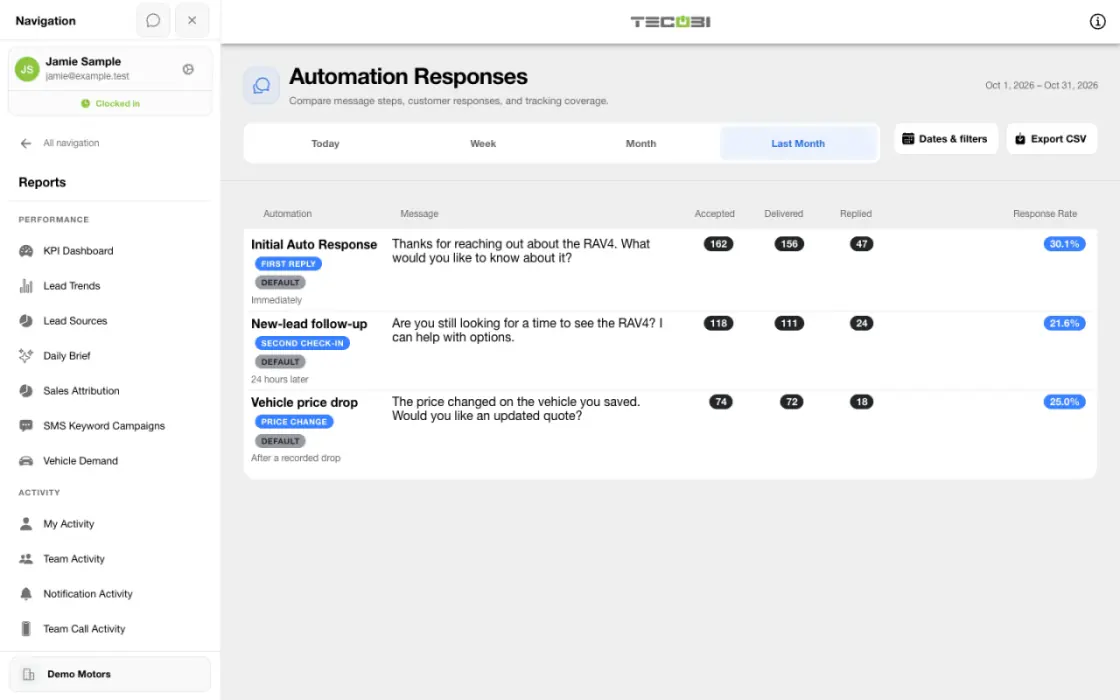
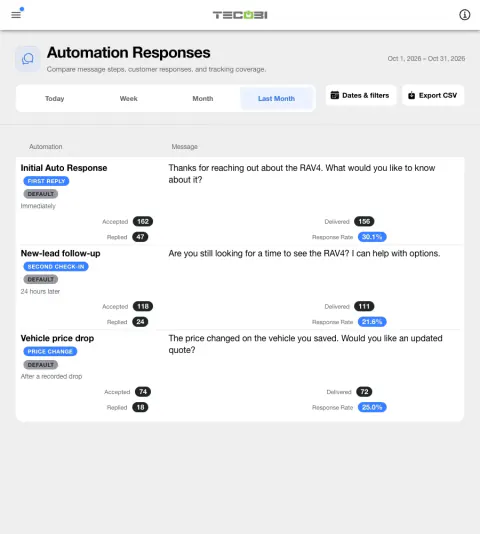
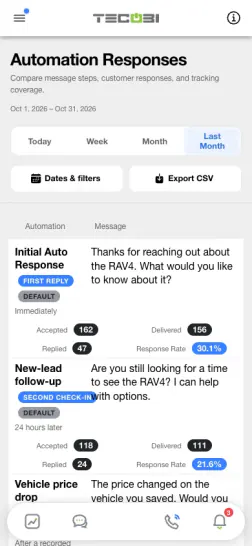
Account for delivery when reviewing replies
Start with one message and period. A message that was accepted by the provider and a message that was delivered are two different events.
See how automated messages perform
Compare recorded replies across the automated SMS messages your dealership uses.
- The report groups tracked initial Auto Response variants and configured follow-up messages into rows, showing the message and available step and timing details.
- The selected date range applies to the outbound SMS send time. A customer reply can be counted after the selected period.
- Accepted, Delivered and Replied are counts of distinct leads within each row, not necessarily unique leads across the entire report.
- The report covers tracked template automation SMS. Auto Bots and text blasts are separate workflows and are not included in this report.
Understand the response rate
Delivery-aware and historical rates use different denominators.
- For rows with delivery tracking, Response Rate is Replied divided by Delivered; when Delivered is zero, the rate is shown as 0.0%.
- Delivery can be confirmed by a delivery receipt; an eligible customer reply can also support delivery confirmation when the message is not marked failed or undelivered. Accepted means the outbound message was accepted for sending; it does not mean it was delivered.
- For older rows without delivery metrics, the report shows Legacy Rate: Replied divided by Accepted. Delivery is unavailable for these historical rows, so compare them carefully with delivery-aware rates.
- A reply is attributed to the most recent eligible tracked automation unless a later customer-facing outbound SMS intervenes. Review the customer conversation for context.
Read the report with the right context
The report describes recorded communication, not a guaranteed sales result.
- Automation response tracking began September 4, 2026, and delivery tracking began September 10, 2026. Data before those dates is not guaranteed; available historical step and timing details can be limited.
- Currently configured messages may appear with zero tracked sends. A zero does not establish how a message performed before tracking was available.
- Compare messages with the same date range and metric definitions, and consider audience and timing before drawing conclusions. A reply is not an appointment or a sale.
- Report access and available data depend on dealership setup and user permissions. The CSV export contains the available report rows.
Connect reporting to your follow-up
Use the numbers to start a better conversation with your team.
- Use the report to review your configured first responses and follow-up messages, then consider which conversations need a personal next step.
Put the workflow into practice.
Open Reports → Automation Response Rates with the appropriate report access.
Choose a date range of up to 90 days to review messages sent during that period.
Compare the available message, step and timing details along with accepted, delivered and replied counts.
Export the report as a CSV and review the definitions, data coverage and underlying customer context with your team.
Connected TECOBI tools
Questions dealers ask
Why might two reports show different totals?
Reports may use different date fields, eligibility rules, scopes or outcome definitions. For example, an appointment created in a period is different from one scheduled to occur in it. Read the report’s definitions and filters before comparing totals.
What if an expected outcome is missing from a report?
Check the account, date range and whether the underlying event was recorded with the required outcome. If it still appears wrong, ask TECOBI support to investigate the relevant report and record through a secure support request.
Are all TECOBI follow-up messages written by AI?
No. Auto Bots use AI and prompt guidance for proactive follow-up. TECOBI also has separate configured template automations for particular events. Those can include returning lead submissions, vehicle acquisition inquiries, selected appointment outcomes, price drops, post-sale check-ins and birthdays. Use the appropriate workflow for the customer’s situation.
Setup and availability
Sales & AI Reporting: setup and availability
Available report views and drill-down access depend on account permissions and configuration.
Reports describe recorded data and defined attribution rules; they do not guarantee results or establish causation.
Example screenshot values illustrate the interface and are not promised dealership performance.
Submission and assignment history depend on when tracking began. A period can have partial or unavailable coverage.
Vehicle Demand uses recorded interest and current in-stock inventory. It does not measure every shopper, predict future sales or automatically purchase inventory.
Auto Bots® Follow-Up: setup and availability
Auto Bots® handle proactive text follow-up. Inbound Response Bot replies, staff phone calls and this website’s Talk guide are separate workflows.
Your dealership’s audience, timing, hours and sending controls determine which conversations are eligible. Recent activity, customer restrictions and human handoffs can pause or change the next touch.
Authorized users can review and adjust the configuration. Follow-up and reporting help your team work opportunities; they do not guarantee a response or sale.
Event-triggered template automations are separate from AI Auto Bots. Each workflow has its own configuration, timing and eligibility checks; no universal cadence or identical inactivity rule applies to all of them.
Business Texting for Dealership Teams: setup and availability
Texting requires an eligible contact and correctly configured sending number; carrier delivery is not guaranteed.
Opt-out and account controls may restrict sending. Staff should respect customer contact preferences.
Available media types and delivery behavior differ between SMS, MMS, links and email.
ASK ME ABOUT IT