




COMPARABLE VEHICLE PRICING
Know where your used vehicles stand.
Give your salespeople a clearer price conversation and your managers a more informed inventory review. Compare your asking price with similar vehicles, see which dealers have them and open the specific vehicle listings.
Actual TECOBI app · Fictional example data
THE ACTUAL TECOBI EXPERIENCE
From market position to the actual listing.
Explore the real app on desktop and phone. All vehicles, prices, dealer names and listing examples shown here are fictional.
MARKET CONTEXT IN INVENTORY
See the price position beside the vehicle.
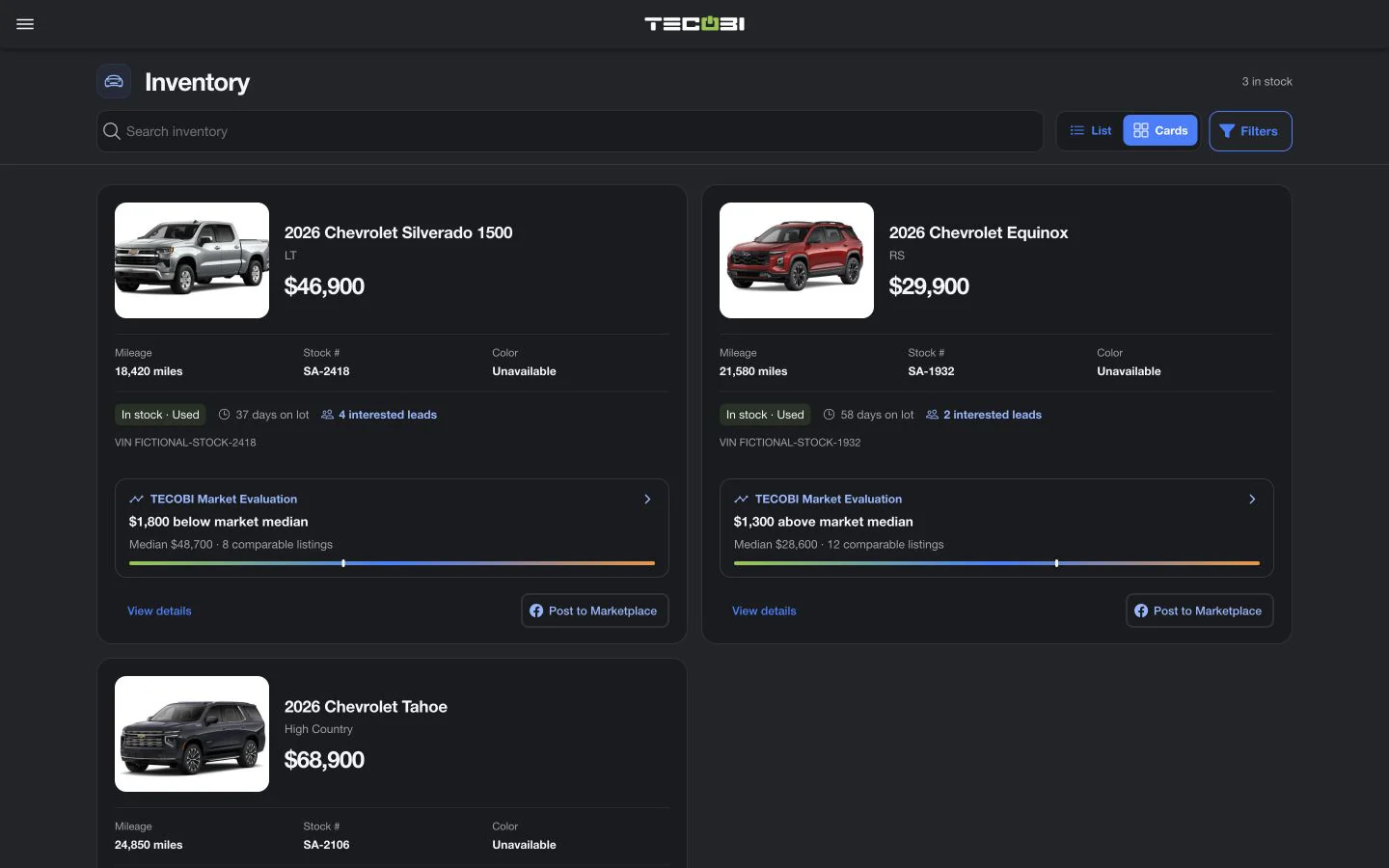
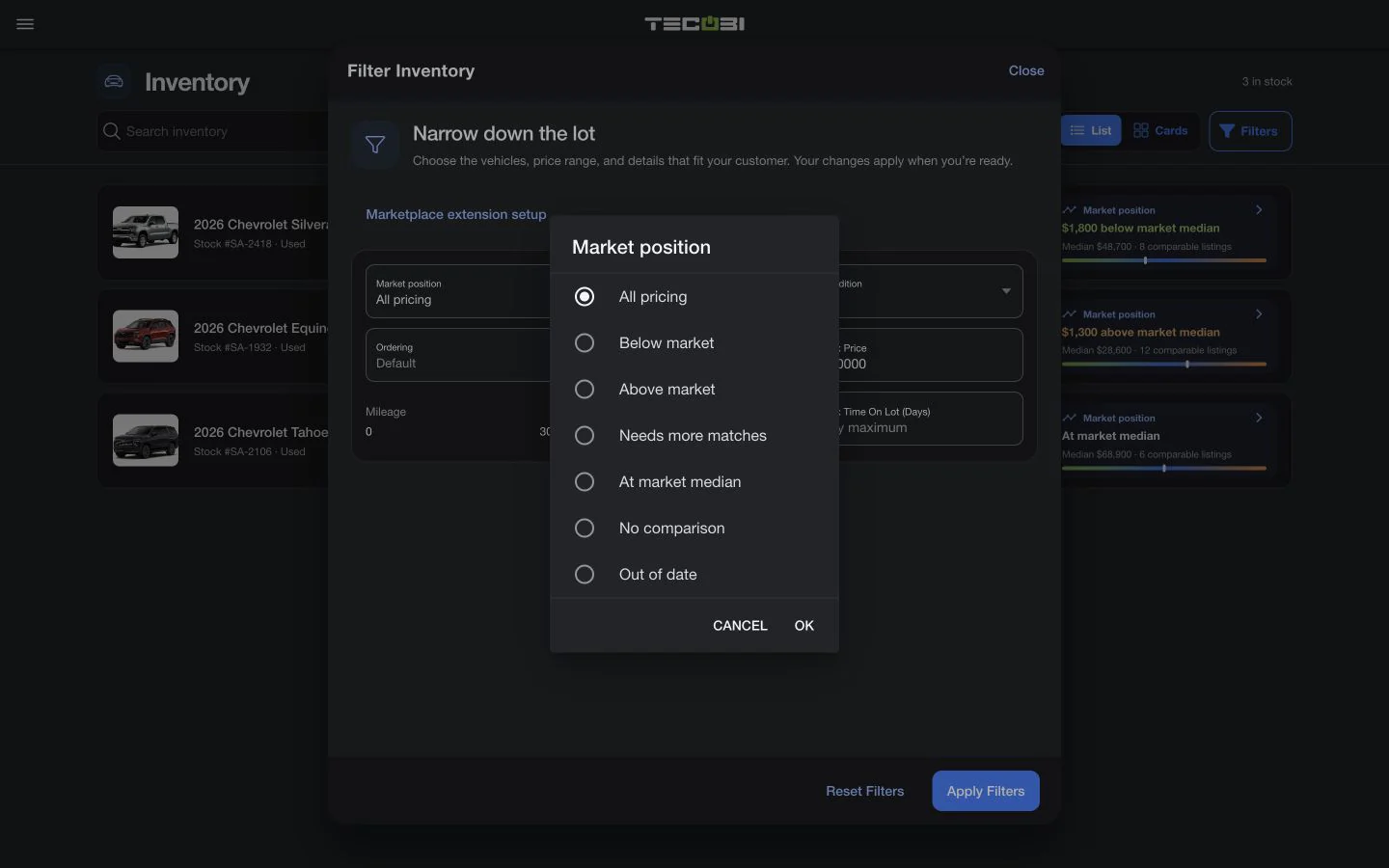
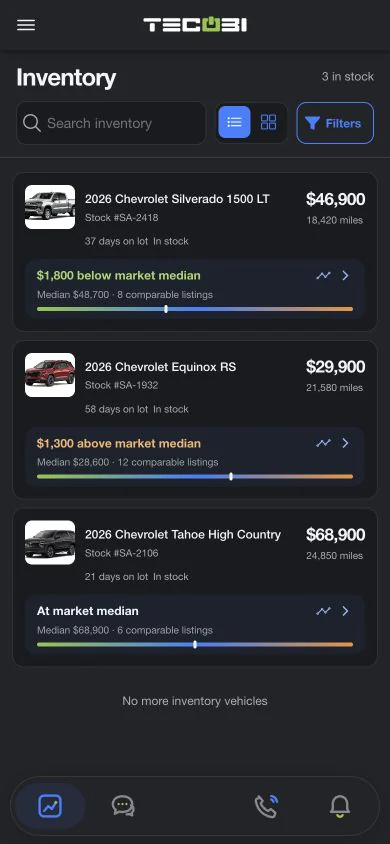
The market evaluation sits inside the inventory your team already uses. Read the asking price, market median and comparable count without leaving the vehicle workflow. Both list and card views keep that context close.
- Below, at or above the matched market median
- Vehicle price, mileage and stock number in the same view
- A detailed evaluation available from the market-position control
UNDERSTAND THE COMPARISON
Go beyond a price badge.
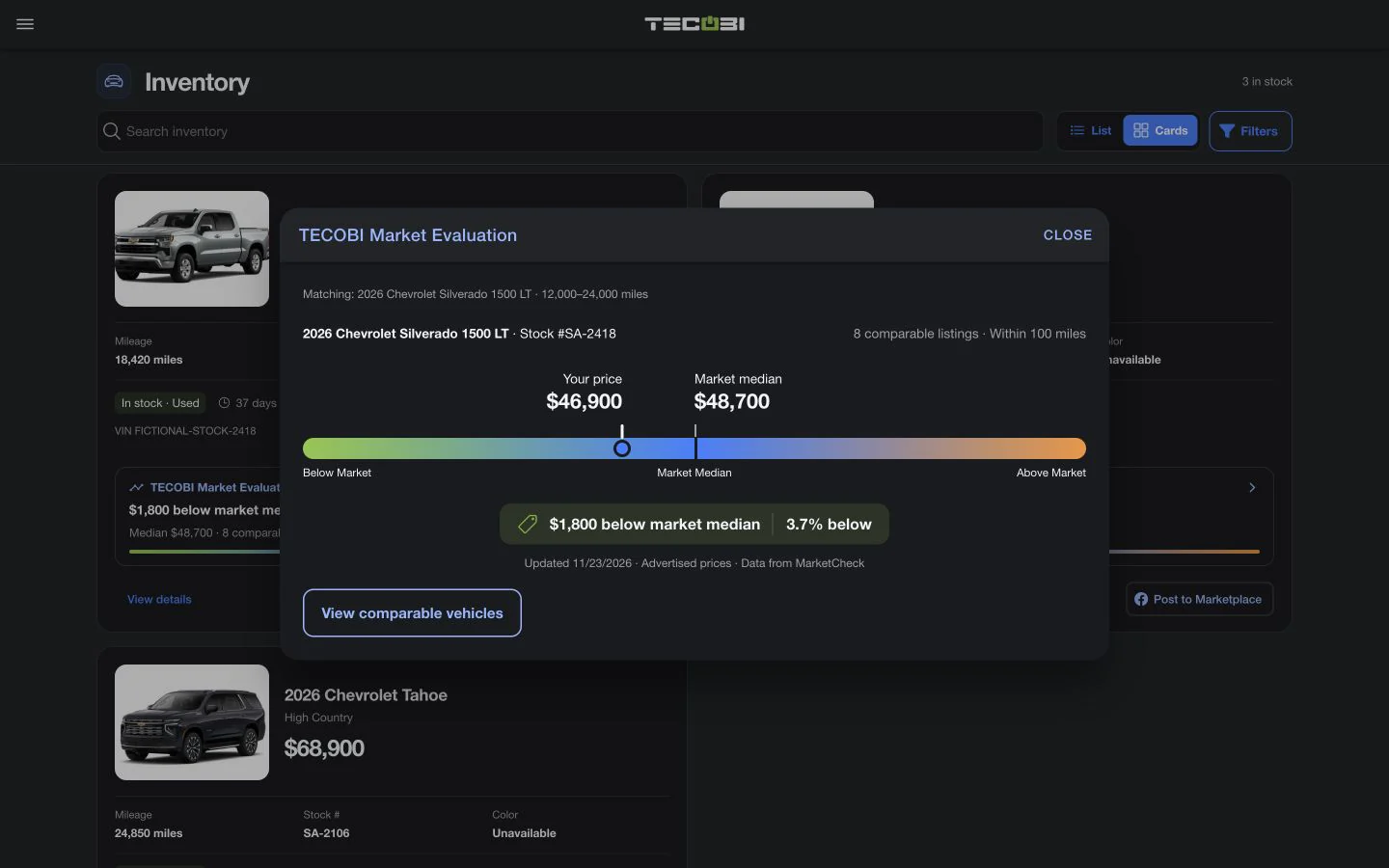
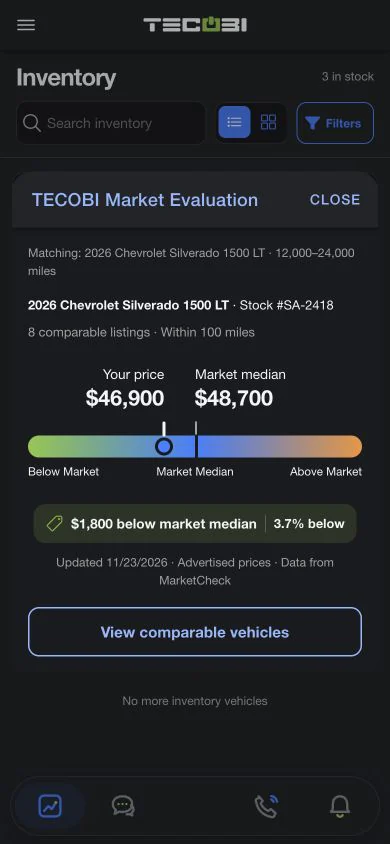
Open TECOBI Market Evaluation to see the asking price against the market median, with the dollar and percentage difference. The report gives the comparison context before your team draws a conclusion.
- Check year, make, model, trim and mileage range
- Review the comparable count and search radius
- See the update date and advertised-price data source
SEE THE OTHER DEALERS
Find the vehicles behind the number.
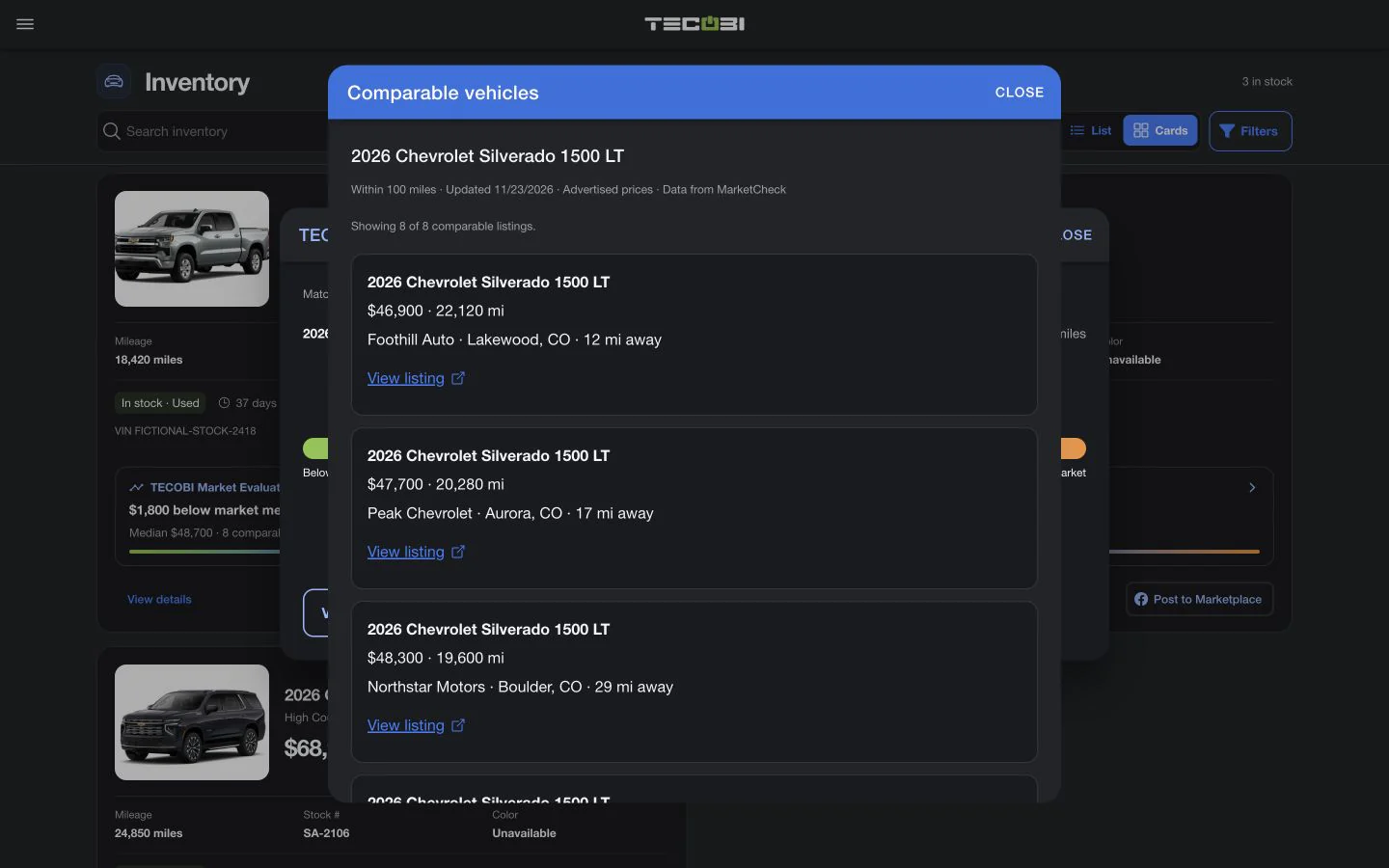
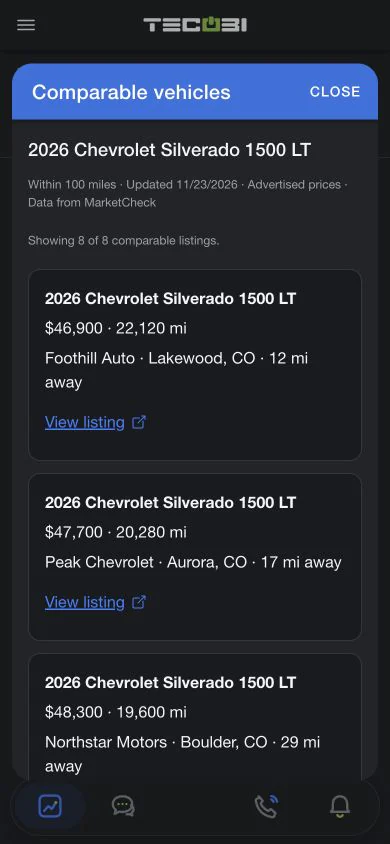
Choose View comparable vehicles to see which other dealers have similar inventory. Each available listing shows the advertised price, mileage, dealer, location and distance so your team can evaluate the actual alternatives.
- Compare asking prices and mileage across the matched vehicles
- See the dealer name and where each vehicle is listed
- Choose View listing to open that specific vehicle’s original listing
In the app, View listing opens the available source listing. The screenshot on this page opens in an image viewer.
FOR SALESPEOPLE
Put a price conversation on firmer ground.
A customer has another vehicle in mind. Start with the comparison, open the other dealer’s listing and check what differs. Use the information to explain your vehicle’s position and ask better questions about what matters to the customer.
- Check that the comparison fits the vehicle and customer
- Discuss equipment, mileage, condition and history
- Build a useful explanation rather than relying on a label
FOR MANAGERS
Focus the next inventory review.
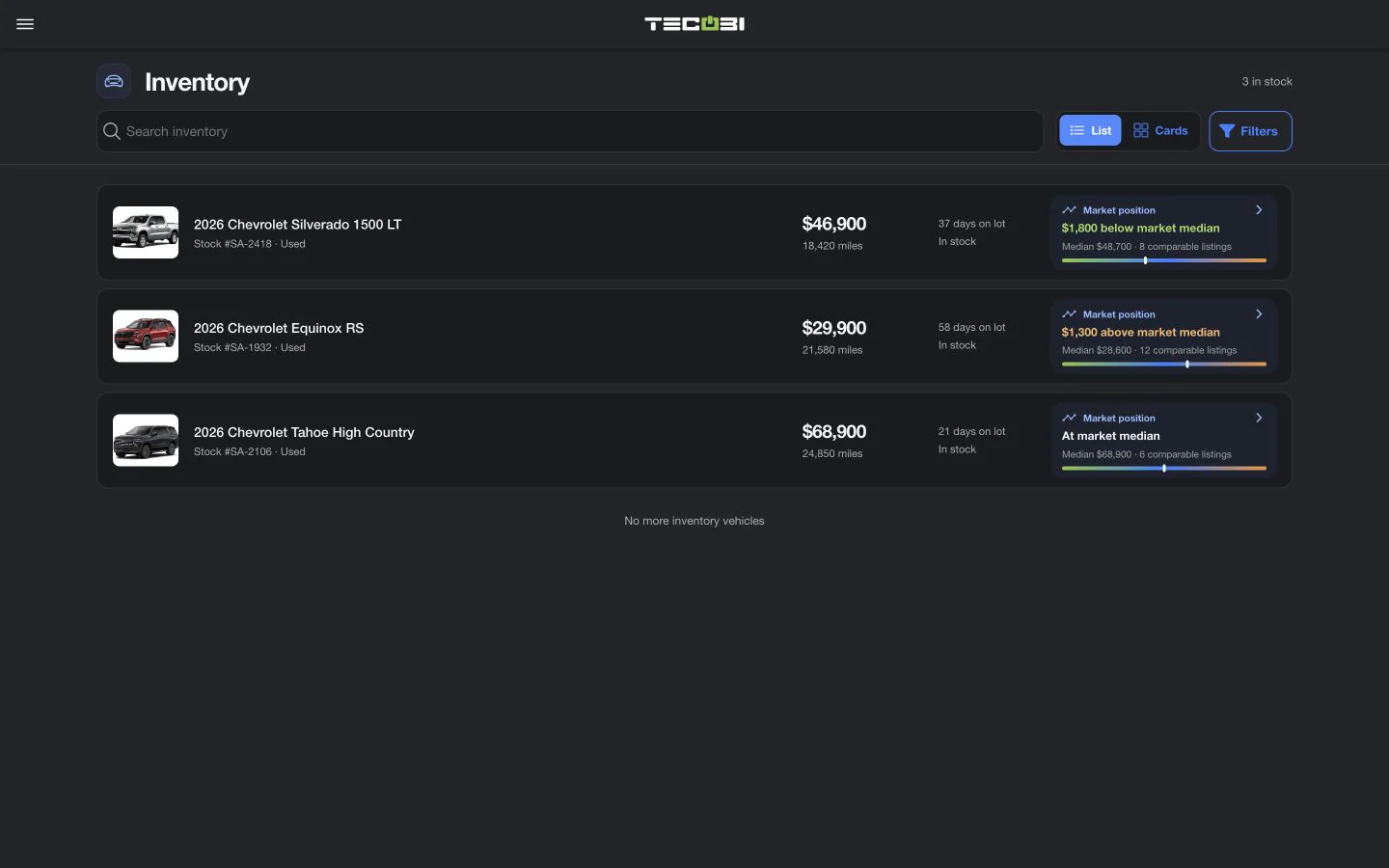
Use market-position filters to narrow the lot. Review above-market vehicles alongside time on lot, then inspect the comparable dealers and listings before deciding whether a vehicle needs attention.
- Filter Below market, Above market or At market median
- Find vehicles that need more matches or have an out-of-date comparison
- Combine market context with the available inventory and time-on-lot filters
AT THE DESK OR ON THE LOT
Bring the comparison with you.
Check market position, open the report and inspect other dealers’ listings from your phone. The workflow stays close to the vehicle wherever the conversation happens.
READ IT WITH CONTEXT
A useful comparison starts with the right questions.
These are advertised asking prices. The market median describes the matched sample, not a guaranteed sale price or a trade appraisal.
- Does the vehicle match?
- Review trim, mileage, equipment, condition and history. Read any broader-match or expanded-radius notice.
- Is the sample useful?
- Check listing count and freshness. Needs more matches and Out of date are signals to inspect the context before relying on a rating.
- What should change?
- Your dealership decides pricing and offers. The evaluation does not automatically reprice inventory.
A CLEARER PRICING CONVERSATION
See comparable pricing in your dealership’s workflow.
Ask TECOBI about availability for your eligible used inventory.
Book a demoSetup and availability
Comparable pricing is available for enabled dealerships and eligible used inventory.
- Available for enabled dealerships and eligible used inventory with verified mapping and comparable data. Coverage varies by vehicle and market.
- Comparisons use advertised asking prices. Review matching criteria, update date and any limited-match or out-of-date notice. Condition, history, options and reconditioning still require dealership judgment.
- All screenshots show the actual TECOBI app with fictional inventory, prices, dealers and listing examples. They are not current vehicle offers.
Put the workflow into practice.
Start with eligible used inventory. Open Inventory and find a vehicle with a TECOBI Market Evaluation. Availability depends on dealership enablement, verified inventory mapping and comparable data.
Read the market position. See whether the vehicle is below, at or above the market median. The report shows your asking price, the median, dollar difference and percentage difference when enough comparable data is available.
Check what was compared. Review the matching year, make, model, trim and mileage range shown in the report. Check the search radius, comparable count and update date before drawing a conclusion.
Inspect the underlying vehicles. Choose View comparable vehicles to review advertised prices, mileage, dealer, location and distance where supplied. Use View listing to inspect the original source when available.
Bring dealership judgment to the next step. Compare equipment, condition and history before deciding how to present or review a price. TECOBI provides market context; your dealership decides the vehicle price and customer offer.
Connected TECOBI tools
Questions dealers ask
What does market median mean?
The median is the middle advertised price in the matched comparison set. With an even number of listings, it is the midpoint of the two middle prices. It describes that sample, rather than a guaranteed transaction price.
Which vehicles are compared?
The report displays its matching criteria and mileage band, plus the radius and listing count. Review any limitations shown, including a broader trim match or expanded radius when local comparisons are limited.
How does this help a salesperson?
It gives the salesperson a concrete starting point for a price conversation. Check the report, inspect similar listings and discuss meaningful differences such as equipment, mileage, condition and history.
How does this help a manager?
Market-position filters help narrow the inventory review. Combine the comparison with time on lot and your dealership knowledge to identify vehicles worth reviewing and coach the team on the reasoning behind the asking price.
Can the team use it on a phone?
Yes. Market position, the detailed evaluation and the comparable listings are available in responsive inventory views. The examples on this page show the actual app at desktop and phone sizes.
What happens when there are not enough matches?
The app can show Needs more matches rather than presenting a confident market rating. The normal market rating requires at least three comparable listings and a usable median. Some reference vehicle reports do not receive a normal market rating.
Are these sold prices or an appraisal?
They are advertised asking prices from comparable listings, with the source and update date shown. They are not verified sold prices, a trade appraisal or an automatic adjustment for condition, history and reconditioning.
Does TECOBI automatically change our prices?
No. The evaluation provides comparison information. Your dealership remains responsible for pricing decisions and customer offers.
Why might a vehicle not show a comparison?
Availability depends on dealership configuration, verified inventory mapping and an eligible used vehicle with comparable data. A changed vehicle record or out-of-date snapshot can affect what is shown. Ask TECOBI to confirm availability for your dealership.
Setup and availability
Inventory & Customer Shopping: setup and availability
Inventory and favorites depend on the dealership’s configuration and the type of customer link.
Listing details come from connected data; a displayed price or in-stock status is not a guarantee of a current offer or physical availability.
The product image is a captured example of inventory cards and favorite controls. Its vehicles, prices and stock numbers are not current offers.
ASK ME ABOUT IT