



AI follow-up context
Give your follow-up a little more context.
A useful detail from a call or in-person conversation can help your dealership continue a more relevant follow-up. Save the detail as an internal note, then deliberately choose whether an eligible note can be included in AI prompts.
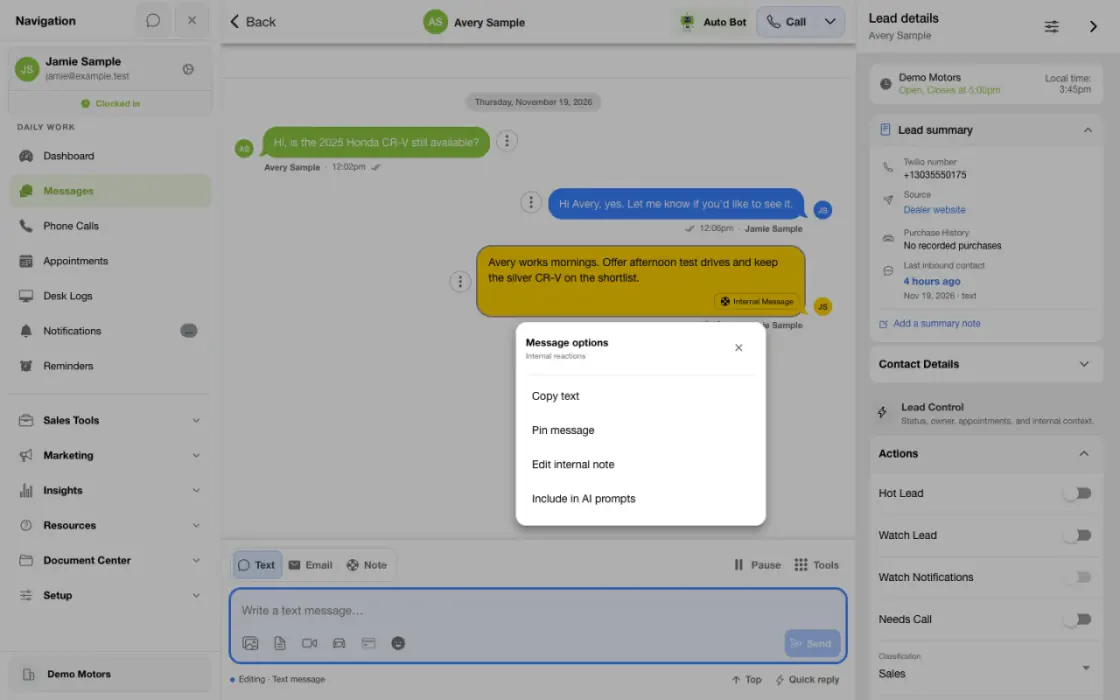
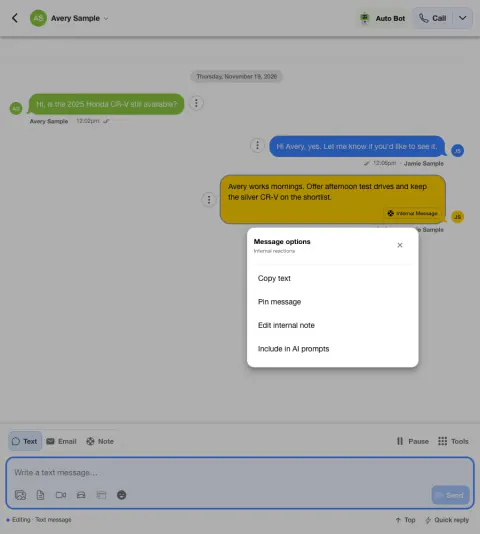
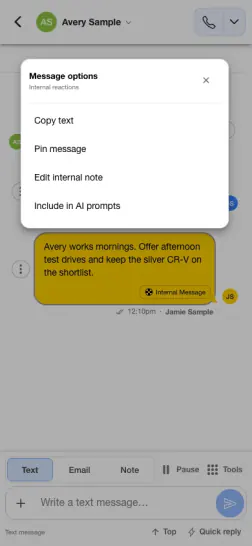
Give AI a note that helps with the next reply
A shopper can only visit after 5 p.m. Record the time constraint so eligible follow-up can use it.
- Write the useful detailRecord the date or time constraint in plain language.
- Review before including itUse the available option to include the note in AI prompts when appropriate.
- Check the next messageReview the conversation for how the note affects the next step.
Save the detail for your team
A note can preserve useful context learned outside the text conversation.
- Note mode saves an internal message in the conversation; it is not the same as sending a customer-facing text.
- Use a concise factual detail that is appropriate for the customer conversation, such as a vehicle preference or a question the shopper wants answered.
- Check the saved note and correct mistakes using the available internal-note controls. Do not include passwords, payment information or other unnecessary sensitive details.
Choose what AI can use
Saving a note and making an eligible note available to AI are separate actions.
- A regular internal note is not automatically included in AI prompts merely because it was saved. Open the note’s actions and choose Include in AI prompts when available.
- After a note is included, the action changes to Exclude from AI prompts. Choosing that action removes the explicit AI-context selection for that note.
- AI history is bounded by the workflow’s available context, so marking a note does not guarantee it appears in every prompt or changes the next message. Some older Comments notes have separate legacy handling.
- Restricted internal or administrator-only notes and certain restricted mentions cannot be made AI context. If an action is unavailable or fails, ask your dealership administrator or TECOBI Support.
Review the follow-up and keep the team in control
The note adds context; your dealership’s bot configuration still controls follow-up.
- In Lead details, open Engagement Tools and expand Next AutoBot Message to review an available example and expected message time. They are a preview, not a guarantee of the final wording or send time.
- A shared note remains internal, but information from it may shape a customer-facing AI message. Review the conversation and share only details appropriate for that use.
- Sharing a note does not pause or reschedule an Auto Bot. Customer status, pauses, message activity, dealership settings and other eligibility rules still affect follow-up.
- If messages contain incorrect information or repeat unexpectedly, review the bot setup with your administrator and contact TECOBI Support through the secure support workflow.
- Limited customer context can contribute to similar follow-up messages. Review the recent conversation and bot guidance rather than assuming there is only one cause.
Put the workflow into practice.
Open the customer conversation and read the recent messages so you understand what the customer has already shared.
Choose Note in the conversation composer. Write a short, accurate, customer-appropriate detail and select Send to save the internal note.
Open the saved note’s message actions and choose Include in AI prompts when that action is available.
To remove that access later, open the same note’s actions and choose Exclude from AI prompts.
Connected TECOBI tools
Questions dealers ask
Does saving a note send it to the customer?
No. Note mode saves an internal message. A customer-facing text is a separate action.
Does every internal note automatically go to AI?
A regular note is not automatically included simply because it was saved. An eligible note can be explicitly included through its message actions. Some older Comments notes have separate legacy handling.
Will including a note change the next Auto Bot message?
It can provide useful context, but the workflow’s history limits, timing and configuration determine what is available. It does not guarantee different wording or a particular send time.
Can I remove a note from AI prompts?
For an included note, open its message actions and choose Exclude from AI prompts. Check the updated action and ask your administrator if the change fails.
Setup and availability
Auto Bots® Follow-Up: setup and availability
Auto Bots® handle proactive text follow-up. Inbound Response Bot replies, staff phone calls and this website’s Talk guide are separate workflows.
Your dealership’s audience, timing, hours and sending controls determine which conversations are eligible. Recent activity, customer restrictions and human handoffs can pause or change the next touch.
Authorized users can review and adjust the configuration. Follow-up and reporting help your team work opportunities; they do not guarantee a response or sale.
Event-triggered template automations are separate from AI Auto Bots. Each workflow has its own configuration, timing and eligibility checks; no universal cadence or identical inactivity rule applies to all of them.
AI Texting & Response Bot: setup and availability
Reply modes, delays, permissions and customer context determine when Response Bot runs. Connected inventory and appointment workflows depend on the dealership’s configuration.
Negotiation, finance decisions and questions requiring dealership judgment need a person. An AI answer is not a binding out-the-door quote or finance approval.
Dealership AI calling is not available yet. The website’s Talk guide explains TECOBI; it does not access private accounts or perform customer actions.
The example shows the shared conversation workspace with demonstration identities. It does not identify a particular message as AI-written.
Automotive CRM & Lead Management: setup and availability
Available tools depend on dealership configuration and user permissions.
Integration coverage varies by provider; TECOBI does not automatically synchronize every field with every CRM or DMS.
Pipeline and activity screens describe recorded work; they do not guarantee a sale or prove why it happened.
Survey access depends on dealership membership and user role or assignment. Automatic post-sale survey requests require enabled configuration and an active sending workflow; no universal schedule, delivery or response is promised.
Text Ninjas is an optional service. Confirm the service scope, coverage hours, handoffs and current pricing with TECOBI. No particular staffing ratio, response-time guarantee or managed phone service is promised here.
Business Texting for Dealership Teams: setup and availability
Texting requires an eligible contact and correctly configured sending number; carrier delivery is not guaranteed.
Opt-out and account controls may restrict sending. Staff should respect customer contact preferences.
Available media types and delivery behavior differ between SMS, MMS, links and email.
ASK ME ABOUT IT